
Postcard Bleed Size: 4x6 Bleed, Trim and Safe Zone Guide
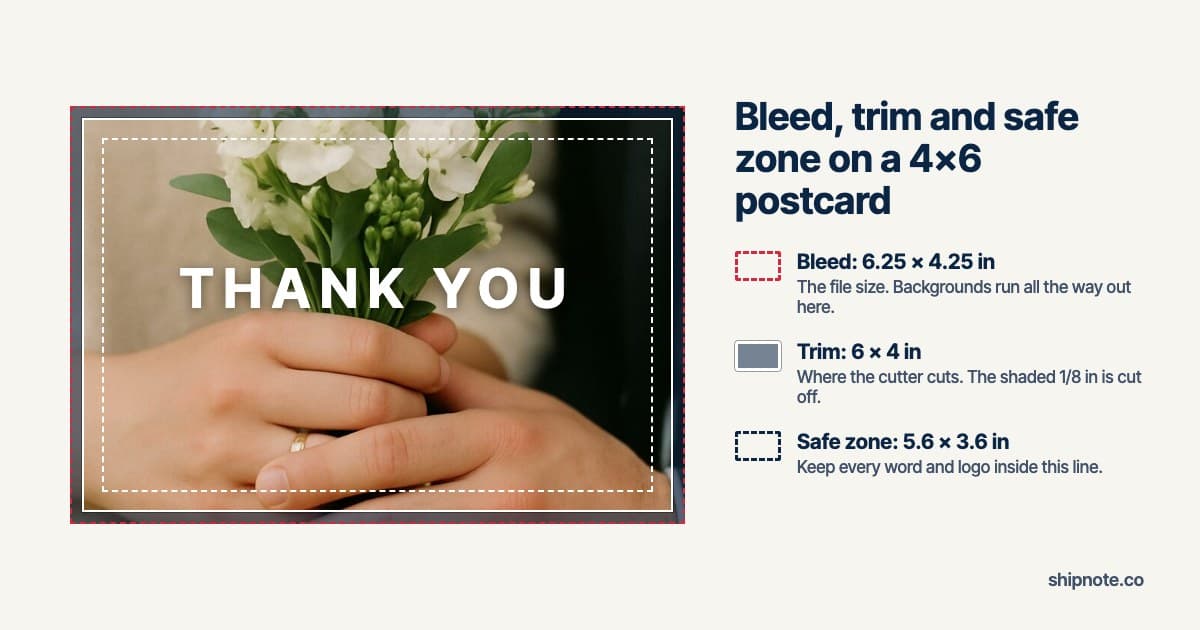
A 4x6 postcard is built as a 6.25 x 4.25 inch file: the 6 x 4 card plus 0.125 inch of bleed on every side. Backgrounds and photos run all the way to the edge of that file. The cutter trims 0.125 inch off each side, and everything a reader needs to see stays at least 0.2 inch inside the cut.
That's the whole rule. The rest of this guide explains each line, gives you the exact pixel sizes, and shows what happens when a file skips one.
We print and mail 4x6 postcards at ShipNote, and the numbers below are the ones our cards are cut to. If you're uploading your own design to our Blank card, these are the lines the editor draws on top of it.
What are bleed, trim and safe zone?
Bleed is extra image past the finished edge, trim is where the card is cut, and the safe zone is the inner area where text is never at risk. A postcard is printed on a larger sheet and cut down. The three lines exist because that cut is never perfectly placed.
- Bleed (the edge of your file). 0.125 inch of artwork that sits outside the finished card. It gets cut off. It exists so that if the cut lands a little outside its mark, it still cuts through your background and not through white paper.
- Trim (the finished card). The 6 x 4 inch rectangle the cutter aims for. This is the card that arrives in the mailbox.
- Safe zone (where words go). 0.2 inch inside the trim, all the way round. If the cut lands a little inside its mark, it only takes background, never the end of a name.
A file that skips bleed gets a thin white sliver on the edge where the cut missed. A design that ignores the safe zone gets a date or a logo clipped. Both are cut errors the file could have absorbed.
What size should a 4x6 postcard file be?
Make the file 6.25 x 4.25 inches, or 1875 x 1275 pixels at 300 dpi. For a portrait card, turn it round: 4.25 x 6.25 inches, 1275 x 1875 pixels. Keep text inside the 5.6 x 3.6 inch safe area in the middle.
| Line | Inches (landscape) | Pixels at 300 dpi | What goes there |
|---|---|---|---|
| Bleed (file size) | 6.25 x 4.25 | 1875 x 1275 | Background color and photos, out to the very edge |
| Trim (finished card) | 6 x 4 | 1800 x 1200 | Nothing that has to line up with the edge |
| Safe zone | 5.6 x 3.6 | 1680 x 1080 | Every word, logo, date and signature |
In the file itself, that puts the safe line about 98 pixels in from every edge of a 1875 x 1275 image. If you design in Canva, Photoshop or an AI image tool, set a custom size of 1875 x 1275 pixels (or 1275 x 1875 for portrait) and export a PNG or JPG. ShipNote's editor takes JPG, PNG, WebP and GIF, and HEIC where your browser can open it. Its hint asks for 1200 x 1800 pixels or larger (1800 x 1200 for landscape), which is the floor for a sharp photo; artwork that runs to the edge should use the full 1275 x 1875 (1875 x 1275).
Why 300 dpi? It's the resolution at which a photo reads sharp at arm's length. A smaller image still prints, but softer, and the editor warns you when an upload is too small for the card.
How do I see the trim line on my own design?
On ShipNote's Blank card, the editor shades the strip the cutter removes and draws a dashed line at the safe zone. Upload your file and look before you go on: anything in the shaded band is cut off, and any word outside the dashed line is at risk.
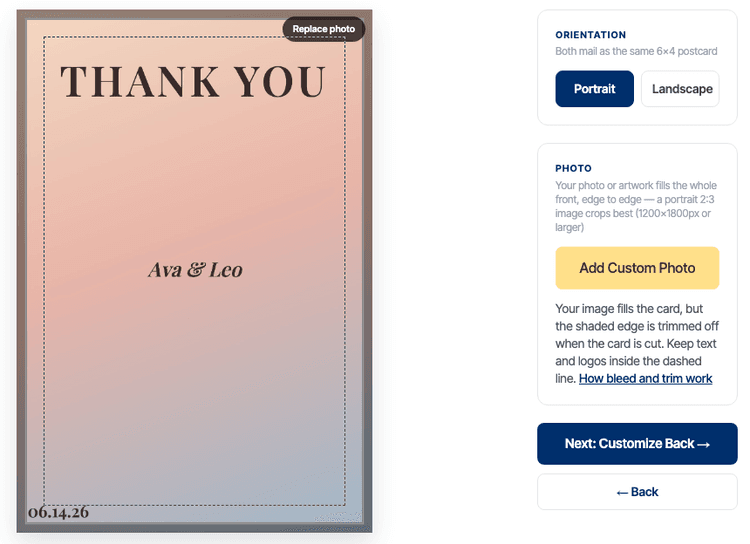
That upload was made to show what goes wrong, and it gets two things wrong:
- The white frame sits inside the cut band. It will be trimmed partly or fully away, unevenly.
- The date in the corner is outside the safe zone. Part of it can be cut off.
The THANK YOU headline is fine: it sits well inside the dashed line. The fix for the other two is the same: bring the frame and the date in. The background can stay exactly where it is.
The lines appear on the Blank card because it is the only design where you control what sits near the edge. Every other ShipNote design is laid out by us. We check every one in a browser, with each headline it comes with and the longest name the form accepts, so its text clears the safe zone and any frame clears the cut.
What should you expect from the printed card?
Expect the photo to fill the card edge to edge, a hair less of the edge than you see on screen, and nothing important missing. Four things are normal, and worth knowing before a batch of 80 cards arrives.
- The edge moves a little from card to card. Cutting machines are accurate to a small fraction of an inch, not to the pixel, so one card can lose slightly more from the left than its neighbour. On a full-bleed photo you will never notice. On a thin border drawn near the edge, you will: it looks thicker on one side.
- An image that isn't card-shaped is cropped to fit. The editor scales your image until it covers the whole card, centered, and crops the overflow evenly from both sides. A square image loses about a third of its width on a portrait card, from the sides, or of its height on a landscape one. A 2:3 or 3:2 photo loses very little.
- A file with no bleed loses a bit more. A plain 6 x 4 inch file (1800 x 1200 pixels) is enlarged about 6% to cover the bleed, then trimmed. You lose about 1/8 inch off the two long sides and about 3/16 inch off the two short ones: the left and right of a landscape card, or the top and bottom of a portrait one.
- Colors shift slightly from screen to paper. A screen glows and paper reflects, so bright screen colors print a little deeper. Very dark images print darker than they look on a phone at full brightness.
The back is different. You never design the back of a ShipNote card yourself: the address, postage and postal barcode areas are reserved, and your message is sized to fit the space that's left. You only write the note.
Does a full-bleed postcard need a border?
No. A full-bleed design runs color off every edge and needs no border at all. That is the safest layout there is, because a cut that lands slightly off still cuts through color. A border is a style choice, not a print requirement.
If you want a frame, keep it inside the safe zone, at least 0.2 inch in from the trim line. Then a slightly off-center cut changes a wide margin by a small fraction of its width, which nobody notices. A frame drawn right next to the edge is the one layout that shows every cutting variation.
Frequently asked questions
What is the bleed size for a 4x6 postcard?
Build the file at 6.25 x 4.25 inches, which is 1875 x 1275 pixels at 300 dpi. That is the 6 x 4 inch card plus 0.125 inch of bleed on every side. Run backgrounds and photos all the way to the edge of that file.
What is the safe zone on a 4x6 postcard?
Keep text, logos and anything that must not be cut at least 0.2 inch inside the trim line. On a 6 x 4 card that leaves a 5.6 x 3.6 inch safe area, which is 0.325 inch in from the edge of the 6.25 x 4.25 inch file.
What happens if I upload a 4x6 file with no bleed?
It still prints, but it is enlarged slightly to fill the bleed and then trimmed, so about 1/8 inch comes off the two long sides and about 3/16 inch off the two short sides. Keep words and borders well away from the edges of a file that has no bleed.
Why does my printed postcard have an uneven border?
Cutting machines are accurate to a small fraction of an inch, not to the pixel. A thin border drawn close to the edge shows that variation as one side looking thicker than the other. Either run the color off the edge or keep any frame inside the safe zone.
Can I use a different size than 4x6?
Not on ShipNote: every card is a 6 x 4 inch postcard, a size that mails at the USPS postcard rate. Thank-you card sizes covers the other common sizes and what each one costs to mail.
Send your own design as a real postcard
Made the artwork in Canva, Photoshop or an AI image tool? Upload it to the Blank card, check it against the shaded edge and the dashed line, and add your list. We print each card, stamp it and mail it to every guest for you. If the image came from ChatGPT or Gemini, how to print and mail an AI-generated card covers what to ask the model for.
Ready to mail your thank-yous?
First batch ships next business day. From $1.99 per card. No subscription.
Create Your Postcards